Cheating in a Digital Age

A recent blog post on edudemic, “How Has Technology Affected Cheating And Plagiarism?” got me thinking.

First, it uses as awesome infographic to deliver most of the content. Infographics are amazing tools for delivering content.

Second, this content is a compelling argument in itself for pushing schools further towards taking responsibility for teaching digital literacy and digital responsibility. By not teaching about plagiarism in a digital world in school, schools are basically forgoing their role in teaching students academic responsibility. Let’s embrace this opportunity!

Third, some of the concerns raised in this post are, in my mind, not necessarily bad. Is it cheating or collaboration? Students see collaboration as a good thing. How do we draw the line between collaboration and cheating? This is definitely a grey area, but one that both students and teachers can explore.

Fourth, another post on edudemic discusses Siri, the iPhone 4S’s “personal assistant:”

This new tool makes it easier to cheat than ever before. It’s not too different from doing a Google search but it makes it easier and faster which means it could be quickly used to secure answers to a test without anyone knowing.

The post goes on, “easier access to resources could make students reliant on the technology and not on comprehension.”

Yes, this could happen. But really, doesn’t this give us an opportunity? If a concept is easy enough to google, then perhaps we don’t need to spend much time on it. Go further. Do analysis, create something, design it, find ways to assess knowledge in ways other than can be completed through Google.

“If you can Google it, it’s not a good assignment.”
-Brian J. Nichols

Brian Nichols is a PhD. student in 21st Century Learning. Where’d I get this quote? From Twitter. From an awesome sounding conference, Edscape.

The Doodle.

I had a boss a few years ago who would make incredibly complex doodles in meetings. In my rarefied, text-based working world, we all thought this was a little odd. Until the day he referred to a sheet of doodles and quoted nearly verbatim what was happening in the meeting at the time he drew that doodle. Personally, I was floored. He was magic!

Move forward a few years. My daughter does the exact same thing. My son does the same thing. Their friends do the same thing.

Yet, they are often told “STOP DOODLING” in class. WHY??

I assume that sometimes the doodling really is distracting the kids. I’m hoping that sometimes the teachers are allowing the kids to doodle, if that’s what works best for them. By not allowing doodling, we are truly denying some kids – all kids, actually – the right learn visually. And that is how some kids work best.

Check out this blog post about an informal doodle test done by a teacher:

My little informal experiment showed that students, who doodled their notes, retained more details of the content they heard and were able to narrate and explain content, connections and sequence better than their counterparts who took text with bullet type notes.

This video (also linked on the blog post) is a great validation of doodling.

Font Size. It Matters!

Awesome article in Smashing Magazine by D. Bnonn Tennant, “16 Pixels for Body Copy. Anything Less is a Costly Mistake”

As the title suggests, the whole point of this article is that websites should be at 16 pixels and above. The default for most browsers is 16 pixels, or about 12 point font or 1 em. Anything less is way too small – take a look at the examples. If you write your CSS to specify a font size, you run the risk of your text being too small for people to read.

But people can change their settings, right? Well, Tennannt says:

The users who will most need to adjust their settings usually don’t know how.

True.

He makes some interesting points about reading online:

  • at age 40, we take in about half the light we did at 20
  • comfortable reading distance from the computer is 28 inches; from a book is only a few inches. That’s why books can be set at 10 or 12 point font.
  • 9% of Americans have a visual impairment that cannot be corrected with glasses.
I admit I don’t particularly like the Smashing layout – I despise red as a link color (it SCREAMS at me) and I’m not fond of the font they use. But that’s their brand, and I don’t have to agree with it.
This does have an impact on educational technology design in two ways:
  1. In my post about the Parent’s Perspective on Standardized Tests, I talk about one companies test that, at the time I reviewed it, did not allow the student to change font sizes. Why would that matter? those kids are all under 20, so they get lots of light to their retina! That may be, but still, each kid is different and might prefer a larger font. The font on the test I reviewed was quite small, and as kids hopefully are 20+ inches from the screen, rather than the few inches from a printed page, the font should be bigger.
  2. Font size also changes with grade level. In my focus groups with teachers, when I asked what makes a website/webpage work well with kids, all teachers — even high school teachers — responded that font size makes a difference. Teachers in younger grades want quite large font with a great deal of white space. Even high school teachers want larger font. Some of them mentioned that when showing a website on their projectors, it is very hard to read blocks of font.
So you web designers and instructional designers. Remember your font size!

Stats in the other Direction

Here’s another follow up to the dreaded article in the New York Times about a school district in Arizona that has had declining test scores in spite of significant spending on technology.

An article in the Washington Post on October 2 about the adoption of online textbooks in a Fairfax County, VA school district rehashed all the negative things about online textbooks and digital learning. These issues have merit, such as access for all students. The district is finding some creative ways to overcome that challenge.

Finally, the positive reasons for moving to digital texts are explored, including this quote from the Assistant Superintendent, Peter Noonan:

“Many of our kids — if not all of our kids — are coming to us as digital natives,” Noonan said. “We should really allow our students to learn the way they live outside of school.”

Other compelling reasons are cost, ability to have up-to-date material, and one I really appreciate – no more heavy textbooks to lug around!

Adds history teacher Mark Stevens,

Those are helpful features, Stevens said, but the online books won’t revolutionize teaching by themselves. They’re only textbooks, after all — “just one tool,” he said, “not the magic bullet.”

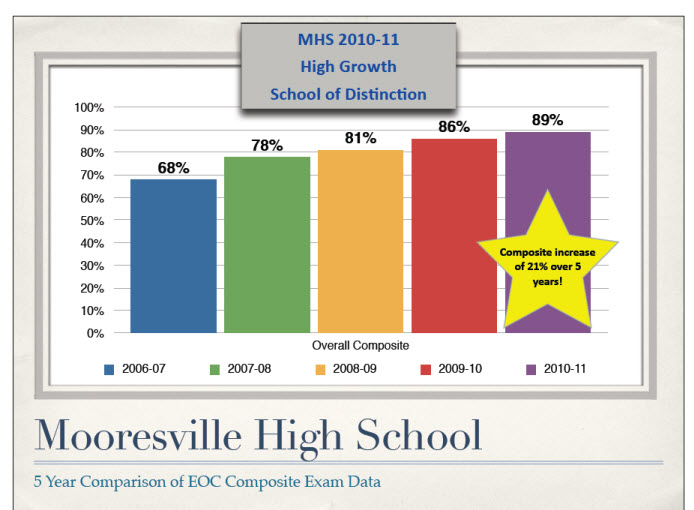
Test data from Mooresville High School shows significant improvement since the introduction of a 1:1 program.

According to the earlier New York Times article, increasing technology is not leading to increasing test scores. (OK, of course the argument is there if test scores are in any way an appropriate measure of learning, but for the sake of this post, I am accepting it – a bit.) Yet, this Washington Post article links to a report from a school district in Mooresville City, NC, that has demonstrated significant test gains after thoughtful introduction of a 1:1 program.

These gains are impressive. Their 1:1 program likely contributed to the gains, but also consider these quotes about the learning philosophy in the district:

  • In several classrooms, I couldn’t tell where the front of the classroom was… The whole space was a learning environment, and the technology was just part of the infrastructure. (page 3)
  • …you’ll find that Mooresville isn’t just passing out laptops — it’s changing the very dynamics of the classroom… Teachers say it fundamentally has changed the way they do their jobs… Now students direct much of their own learning… In such an environment, teachers must learn to “trust kids like you never have before,” says Todd Wirt, principal of Mooresville High School. “The scary thing is giving up control.”

Math & Science: Should they have separate rooms?

I had the opportunity to talk to a high school industrial technology teacher last week. He was proposing a new program for his school – Project Lead the Way. He had initially wanted to start it in high school, but as he had learned more about the project, he was proposing to start it at the middle school level with plans to move it to the high school year by year.

Not knowing much about the industrial technology curriculum, I admit at first I wasn’t particularly interested. However, as he spoke, it became clear to me that this program fits exactly with 21st Century Skills concepts and with the increasing emphasis on STEM programs. It also just MAKES SENSE.

This teacher spoke eloquently about the integration of math and science in the PLTW programs, and in the engineering classes he currently teaches. These classes, he said, are “…the first time students see how geometry applies to daily life.” He explained a project where students had to use principles from both geometry and physics in order to build something.

Schools are the only place where math and science are put in separate rooms,” he said. This sentence floored me. Duh. It’s totally obvious, and so totally obviously WRONG. Why are math and science traditionally taught separately? I highly doubt this happens anywhere else, except perhaps the college classroom.

Here’s a quote from the PTLW site:

PLTW classes are hands-on, based in real-world experience, and engaging for students and teachers. They are most often offered as electives and complement required classes in science and math.

I love the real-world experience idea, and if you read more on their site, you see how they combine the disciplines and emphasize creativity, collaborating, and critical thinking. Sound familiar? Yup – 21st century skills!

But WHY should this be taught as an elective that complements “required classes in science and math?” Couldn’t the required science and math content be integrated into a class?

Teaching science this way could potentially pull kids who have lost interest in the traditional math/science curriculum. It baffes me how they expect kids to stay interested in algebra and higher level math when it’s taught completely outside of any real application.  Some kids are fascinated by the math itself, but I bet many other kids retain interest if they could see how it could be applied and used.

As an example (this blog is from a parent’s perspective!) my daughter is far more interested in creative curriculum (music, art, English) than math and science. For her, math is learned in a vacuum – there is NO context, no application, no visualization. It’s a bunch of numbers on paper with no meaning. It’s a struggle and she can’t WAIT to be done with the required math science courses so she can take courses where she feels more comfortable. With the current emphasis on STEM learning, perhaps kids with this learning style would be more engaged in classes that had creative problem solving, that required collaboration and communication.

iPhone 5 & Infographics

I usually post about education topics, but sometimes there are other things in my wired life… like the iPhone. I currently have an iPhone 3GS, love it, use it extensively. I am, however, likely to upgrade to an iPhone 5 when they come out. I won’t be camping out to get it. I’ll get it when it is convenient for me, when I don’t have to wait in a long line, etc.

The post was prompted by Mashable’s iPhone 5 infographic, “iPhone 5 Infographic: Will You Upgrade?”. This is where the connection to education comes in….

Is this information something I needed? No, but was it interesting? Yes. Would I have spent time reading an article that told me the same information? Probably not. Did I spend the two minutes it took to “read” the infograhic? Yes. I probably got more out of the infographic than I would have from text.

Infographics are incredible teaching tools. The New York Times did a series of articles about teaching/learning with infographics  (intro article: Aug. 23, 2010 ). Infographics are powerful, visual teaching tools for giving kids information.

Richard Byrne (of FreeTechnology for Teachers fame) points out, “Viewing infographics can be helpful, but designing an infographic is a better way for students to increase their understanding of data sets.” That’s our next challenge – having students build their own infographics. Check out 10 Aweseme Free Tools to Make Infographics from the  makeuseof blog.

A Parent’s Perspective on Standardized Tests

A recent article in the New York Times led to a short Twitter conversation with @classroomtools about  standardized tests. As Twitter doesn’t really allow for in depth explanations, I thought I would put my reasons for ranting down on electronic paper.

Because I’m not a teacher, I’ve hesitated broadcasting my feelings about standardized tests. But even parents deserve some small voice in this debate about testing.

  • Here’s what I’m not: I’m no longer a teacher. I’m not an administrator, and I don’t work for the schools.
  • Here’s what I am: I’m a former teacher with an MA in Teaching. I have been involved in informal learning experiences, mostly through museums, for 20 years.  Currently, I work for a museum developing online resources for teachers and students. I am a parent of two school age kids. And, I was a master standardized test taker as a kid.

Why did this article infuriate me? It basically said that the one district’s expenditures on technology were a waste because their standardized tests scores hadn’t gone up.  Well, duh. That’s (hopefully) because the schools are teaching kids using more creative, intuitive tools. They are (hopefully) encouraging more thoughtful learning, critical thinking and creative problem solving, rather than teaching to the test. What a stupid way to measure if that district has been successful.

Reasons I do not agree with the standardized testing movement, in no particular order:

Time: My daughter’s 8th grade algebra teacher spent three, yes THREE weeks prepping the kids for the state test. Was this three weeks of review helpful? Probably, yes, there was merit in reviewing the content learned in 7th grade (this class was one year advanced from math standards). Yet, instead of moving ahead in algebra, they spent three weeks, yes, 15 class days, going over how to take tests, what strategies to use, and reviewing content they were hopefully building on anyway. Really? This was good use of their time?

Time, part 2: An elementary librarian told me she calculated how many days her computer labs were busy for testing – meaning students couldn’t do research and creative projects using the labs. A total of 29 days. That’s SIX weeks of school time when the labs were totally unavailable. (Now, if the school had a 1:1 or BYOD program, this wouldn’t matter.  But that’s a different post.)

Reliability: In five years of standardized testing, my daughter’s scores have ranged from the 67th – 98th percentile. What is that supposed to tell us? Probably that one day she hadn’t had enough sleep, that perhaps she didn’t feel like getting the scratch paper out (which she told me once.) We’ve quickly learned that these scores are worthless and tell us nothing.

Accessibility: Many tests are given on the computer. I should be happy about this, right? Well, I was able to preview one company’s online tests. These tests are supposed to be great because they level with the student, eliminating the ceiling for gifted children. That may be – I can’t argue that point. However, I do know that the tests violate many commonly accepted web design standards. (I build websites and accessibility is a major component of my job.)

  • Font size: students were not able to change the font size – a required feature on any website. Ask any teacher about what websites work for kids – they’ll all say that font size makes a big difference.
  • Line length: the text (for the reading sections) was the entire width of the screen. When is the last time you saw a website that put text in one line over the entire width of the screen? They do that for a reason – our eyes have a hard time keeping on one line.
  • Line spacing: the spaces between lines of text was very tight. Again, standard, accessible web design has more white space between lines, rather than less.
  • Paragraph length: the text for reading excerpts was, of course, reproduced exactly as it is in the book. Standard (good) web writing limits paragraphs to about 5 lines. Our eyes have a hard time making distinctions if there are more lines. Reading on a screen is different than reading a book.
  • Contrast: the color of the screen and text had little contrast.

This is just a few things I observed quickly.  Hopefully, later versions of these tests have adjusted these issues. No, they are not technically on a website, but they ARE reading on a screen, and many of the same principles of basic web design and accessibility apply.

Content: I am not arguing that kids shouldn’t know basic skills – reading comprehension, math, science, etc. They need these skills more than ever. Yet, when these tests are so high stakes, the education program naturally gravitates to focusing on that content. There are only so many hours in a day, and it is well-documented that programs such as art, music, phy ed, recess, are being cut. This harms every child: every child needs to move around during the day, every child needs exposure to creative pursuits like art and music. Kids need to be taught creative problem solving, critical thinking, collaboration. Teaching to the standardized testing does none of that.

Teacher bonuses: Teachers deserve bonuses. They deserve far higher pay and way more respect for their professionalism. I taught for a few years, and was not a good teacher. That’s why I left. Those who are good teachers deserve CEO salaries.

That said, I know many schools are tying teacher bonuses to test results.  This naturally means teachers are more motivated to teach so their kids master the tests. In my experience, the best teachers – and the ones the kids learned the most from – were those who taught creatively, not merely focused on tests.

Gifted: Testing for gifted kids seems like it could be a good thing. Yet, not all gifted kids are good at taking tests. I know of one school district that basis qualifying for their gifted program solely on the results of one specific standardized test. I find this horrifying. What about the kid who is gifted at music? writing?  leadership? art? A child with a learning disability who might not test well?

Standardized tests have a definite ceiling, so they really don’t necessarily accurately reflect a child’s true potential. Much more discussion on problems with gifted children and standardized testing can be found through the Minnesota Council for Gifted and Talented and other organizations dedicated to advocacy for gifted children.

You, too, can annotate in YouTube

Check out this interesting article from MindShift, “Five Reasons YouTube Rocks the Classroom.”

The first three are philosophical:

  1. Inspiration (HUGE access to digital content)
  2. More Access to Students (Flipped Classroom model)
  3. Global Connection (Yup… self-explanatory)

But it’s the 4th and 5th ones, the practical ones, that provide great tools!

4. Customizing Videos
Did you know you can edit videos right in YouTube? Not fancy, but hey. This article says you can do it with a smartphone….I will check that out.
5. Quizzing Students
This is too fun. You can add annotations to your YouTube videos, with speech bubbles, notes and highlights. Then, make them interactive by adding links to other video content (can only link to other YouTube content.) Many possibilities for quizzing, extended learning, self-exploration.

PopNotes

Thank goodness. 3M finally came up with the iPhone/iPad app I’ve been waiting for: PopNotes–  iPhone post-it notes!

I’m sure there are other post-it note type apps out there, but I haven’t found one I liked. I’ve been using PopNotes like crazy since the app was released a week or so ago. I use it every night to makes lists of what I have to do the next day…. make grocery lists…. quick notes about stuff I’ll forget.

It isn’t perfect, although I mostly disagree with this guy’s review of the app. I agree the registration issue is irritating at first, but now I’m done with that. It is true that there are many steps to post the PopNote, and that is irritating.

Here are my complaints:

  • Notes are not editable once you post them. Come on! (although this has been good for me — instead of retyping a task I didn’t complete, I’ve actually just done the dang task.)
  • I have been unable to invite “friends” to PopNotes, as it says you can do. The social aspect of these is somewhat intriguing – especially since they have a geolocation feature to pop up when you drive by a specified place.

Other than that, I’ve been looking for an iPhone feature that might let me do away with the millions of scraps of paper I have on my kitchen table and desk. I love that it has a reminder feature. Here’s a more positive review that points out good things I haven’t used yet.
I’ve tried various “task” apps, such as WunderList, and other apps such as Evernote, etc. I’ve used the Apple Notes app. But PopNotes fits the bill better, and I’m hoping 3M will keep making upgrades so all will be well with the minor issues I see right now.